Apply to Opportunities
How to find and apply to research opportunities on Terac.
Once your phone is verified, you can apply to opportunities from your dashboard at terac.com/me.
Where Opportunities Appear
Invitations, on Home
When you are invited to an opportunity, it appears on Home under You've been invited to. Click Details to read about it, Accept to start, or the X to decline.
Declining an invitation gives up your place on that study, and you will not be able to take part in it later.
Everything open to you, on Explore
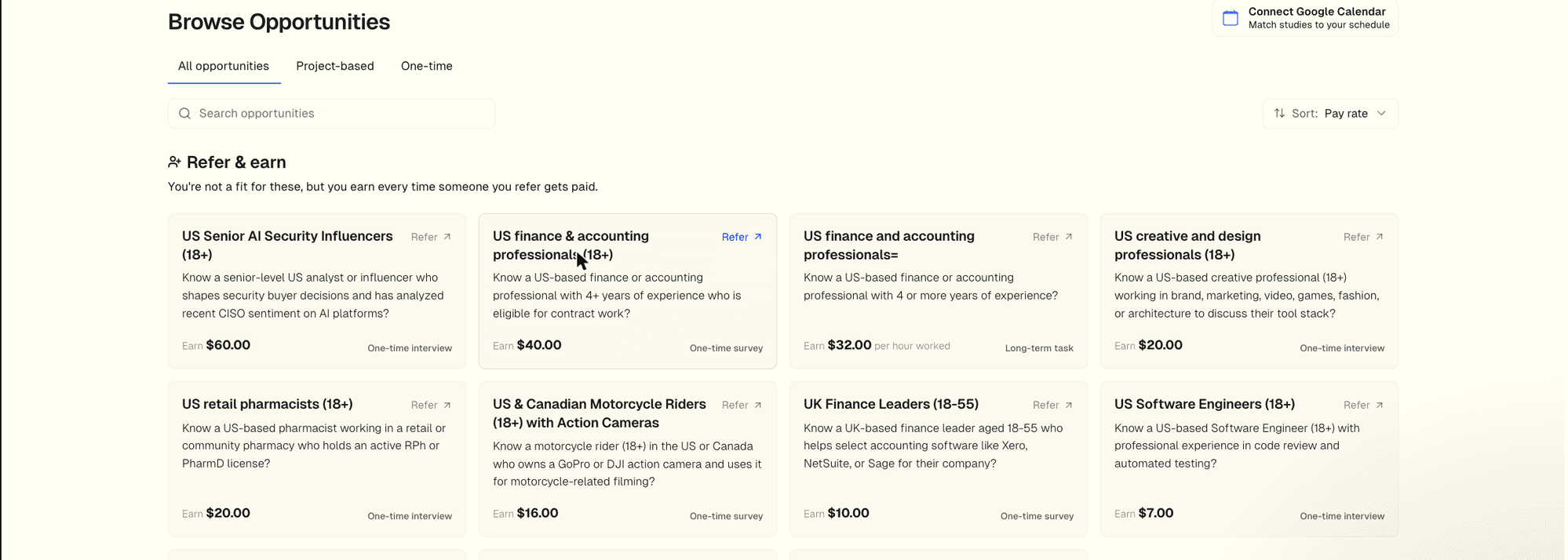
Explore (terac.com/me/opportunities) is headed Browse Opportunities. It has three tabs:
- All opportunities
- Project-based: ongoing work over a period of time, usually paid by the hour or per task, with a project handbook. See Project-Based Work.
- One-time: a single session such as a survey or an interview
You can search by keyword and sort by Pay rate or Spots left.
Opportunities you are not a fit for are listed separately under Refer & earn. You can't apply to those, but you earn a commission if someone you refer to one gets paid. See Referring Others.
The Opportunity Details
Click any card to open its details: the title and pay, the kind of work (for example a voice interview or a survey), whether it is remote, and then What You'll Do, Who Should Apply, and Contract & Payment Terms.
The Application Checklist
Above the details, a checklist headed Application shows your progress:
- Connect your profiles: link LinkedIn or Facebook. This step is optional.
- ID verification: marked Required. You need a verified identity before you can cash out anything you earn, so it is best done before you start. See Verification and Connected Accounts.
Steps like these are reused across opportunities: once your ID is verified, it counts for every opportunity.
The Apply Button
The button at the bottom of the details changes with where you are:
| Button | What it means |
|---|---|
| Finish your profile to apply | Your phone is not verified yet. It takes you back to onboarding |
| Start Application | You are ready to begin |
| Continue Application | You have already started. It picks up where you left off |
| Applications opening soon | The opportunity is not taking applications yet |
The Application Flow
Each opportunity has its own steps, shown in a sidebar as you go. Depending on the opportunity, they can include:
- Connect Accounts: some opportunities need a specific account linked, such as LinkedIn or Google.
- Connect Calendar: for opportunities where Terac books a session for you, connect your Google Calendar so we can find a time you are free.
- Basic Info: any details the opportunity needs that are missing from your profile. If your answers do not match what it is looking for, you will be told straight away.
- Screening: questions to check you are a good fit. This can be a short form, a quick AI voice interview, or a file upload. See Completing Screeners.
- Your forwarding email: an email address just for this opportunity, to use when you sign up for any tools it asks you to use.
- Tasks: the work itself, such as a survey, a file upload, a booked session, or signing a contract. See Completing Tasks.
- Payout: shows what you earn for the opportunity and, once your work is approved, that the payment is on its way to your Terac balance. You choose how to be paid when you cash out.
- Refer & earn: your own link to share this opportunity with people you know.
On a project-based opportunity, the flow ends at You're in instead of a payout, and you work from the project's handbook from then on.
After You Submit
Your work is reviewed after screening, after tasks, or both, depending on the opportunity. Some reviews are automatic and some are done by our team or by the research team. We email you when there is a decision, and the screen you are on says what happens next.
- If approved on a one-time opportunity, your earnings are added to your Terac balance and you can cash out.
- If approved on a project-based opportunity, you are paid for your hours or tasks on the project's payout schedule.
- If you are screened out, you will see Not a fit for this one. It means you did not match what that opportunity needed. You can still apply to others.
Sometimes an opportunity fills while you are still applying. You may see Spot just filled or Reserved for other profiles. Your progress is saved, and if a spot opens up again you can carry on.
FAQ
Can I apply to multiple opportunities at once?
Yes. Each opportunity is independent, so applying to one doesn't affect others.
Can I apply to the same opportunity twice?
No. Each opportunity takes one application per person. If you open one you have already finished, you will see You already participated.
Can I leave an application I have started?
You can decline an invitation from Home, or choose I'm not interested on an opportunity's agreement step. Either one closes that application for good. For anything else, ask Sophia.
Why is an opportunity not showing up on Explore?
Explore does not show opportunities you are already working on or invited to (those are on Home), ones you have already taken part in, or ones that are full. Opportunities you are not a fit for appear under Refer & earn instead.
Where do I see the opportunities I have applied to?
On Home, under Your opportunities, in tabs: Your turn, Waiting on review, and History, plus Paused when more than two of them are paused. Show all opens everything you have taken part in.
What's Next?
Learn about understanding submissions to track your application status, or set up payments to cash out your earnings.